

Attendance
Attendance reports
Analyze attendance by day, service type and method, spot absentees and export the records.
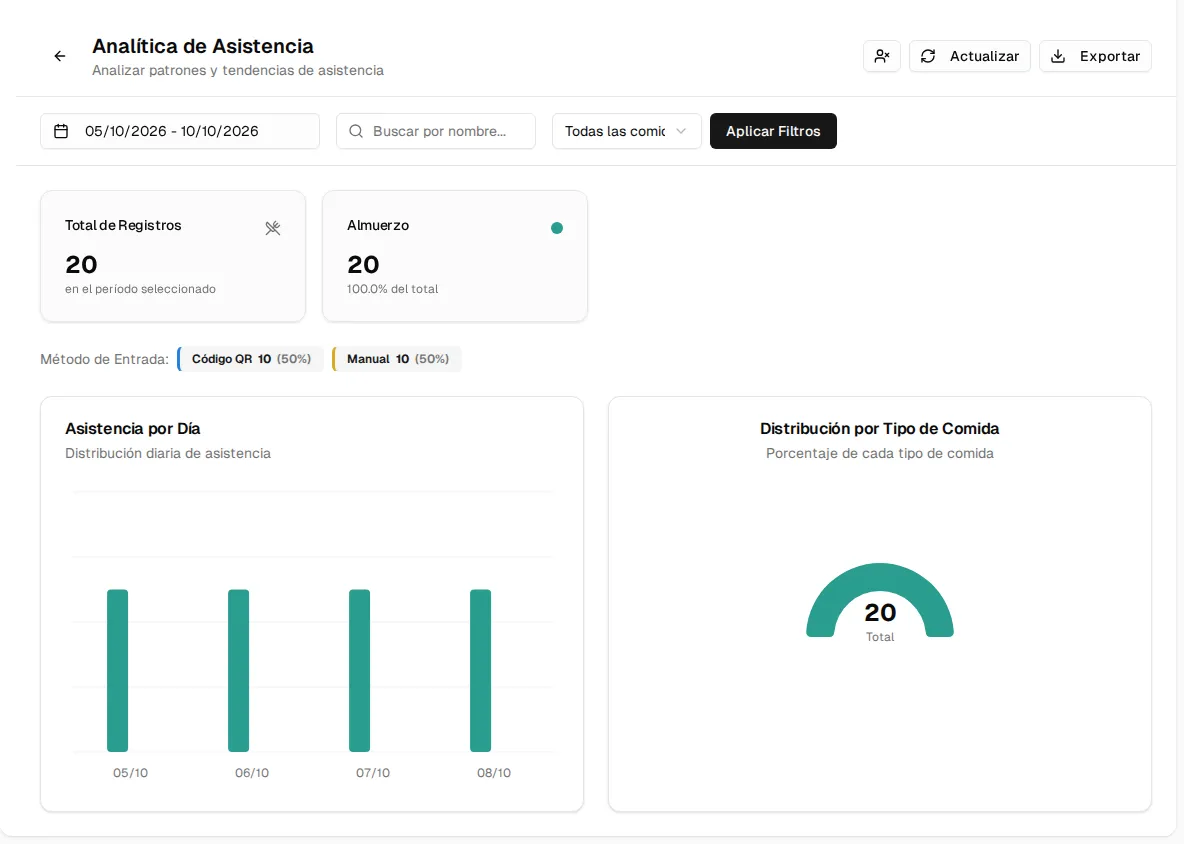
Attendance reports show you who uses your service, how often, and who had the service available but didn’t come. They are in Attendance Records → Analytics (Attendance Analytics screen).
Filters
Section titled “Filters”- Date Range, with shortcuts: Today, Yesterday, This week, This month, Last 7 days and Last 30 days.
- Search by name and service type.
- Click Apply Filters to recalculate and Refresh to fetch the most recent records.
What it shows
Section titled “What it shows”- Total Records for the period and the total per service type.
- Entry Method: how many records were by QR code and how many manual.
- Attendance by Day and Distribution by Meal Type.
- Top Attendees and the Attendance Records table (person, plan, type, date and method).
Absentees
Section titled “Absentees”The Absent Users button (person icon, next to Refresh) switches to the absentees view: it cross-checks active subscriptions against the days that had a Meal Menu and lists those who had the service available but didn’t record attendance, with the total number of absentees, the days with a menu and each person’s missed meals. From there you can notify the responsible person via WhatsApp.
Export
Section titled “Export”Export downloads the period’s records in Excel, CSV or PDF; in the absentees view, the list of absentees in Excel.
History per person
Section titled “History per person”A beneficiary’s full history is in their profile, History tab (see Manage members).