

Roles & permissions
Roles
How roles work in Inspow, which ones come ready to use and how to create your own.
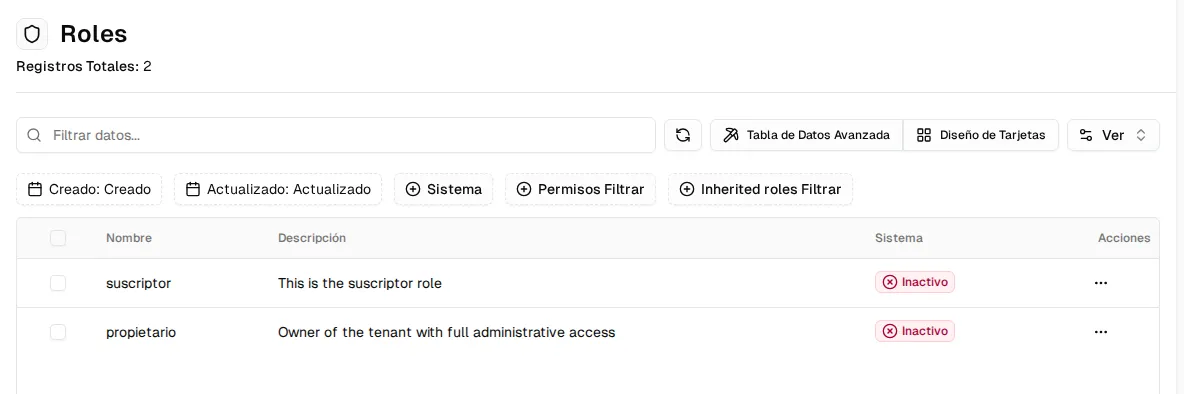
Roles determine what each person can do within your organization. A role is a set of permissions; you assign one or more roles to each user. They are in the Roles menu.
Ready-made roles
Section titled “Ready-made roles”Inspow comes with a catalog of roles shared by all organizations. The most used ones:
| Role | For whom |
|---|---|
| owner | The owner of the organization: full access. |
| admin | Administrators: access to the whole permissions catalog. |
| teacher | Staff who view and update information. |
| user, student, guest | Read-only access. |
| suscriptor | Paying clients (guardians or account holders): they see their own account, beneficiaries, subscriptions and invoices. |
| wa-admin, wa-supervisor | The WhatsApp agent team. |
These roles are read-only for your organization: you can’t edit or delete them, or create a new one with the same name.
Create a role
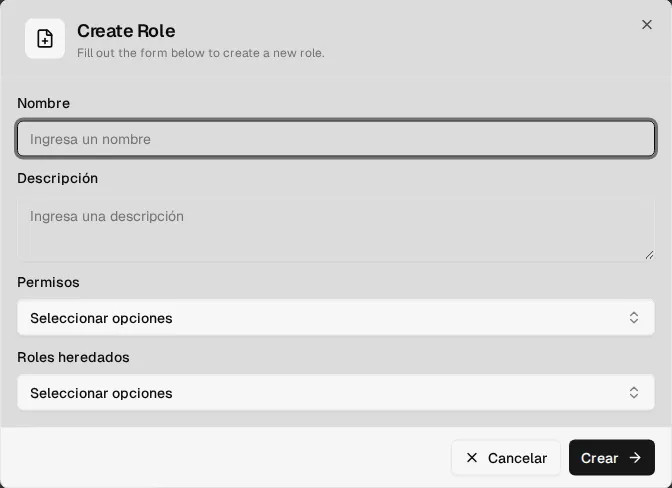
Section titled “Create a role”Click Create Role and fill in:
- Name and Description.
- Permissions: search for and check the ones it needs (for example
read:meal-menusto view the menus). - Inherited roles: if you choose another role, the new one inherits all of its permissions in addition to its own.
Best practices
Section titled “Best practices”- Assign the role with the minimum permissions needed.
- Use inheritance to avoid repeating permissions: for example, a “Coordination” role that inherits from an “Operations” role and adds billing.
- Periodically review who has administrative access.