

Meals
Costs and purchase list
Calculate the purchase list and the estimated cost of the selected menus.
Each Meal Menu brings together recipes, and each recipe lists its ingredients with quantity, unit and waste. With that data and the price of each ingredient, Inspow consolidates the purchase list and its estimated cost.
Calculate the purchase list
Section titled “Calculate the purchase list”- In Meal Menus, switch to the week view.
- Select the menus with Ctrl + click (or Select Week to take all the ones in the week).
- Click Calculate Purchases.
For a single menu, open its ⋯ menu in the weekly view and choose View Ingredients.
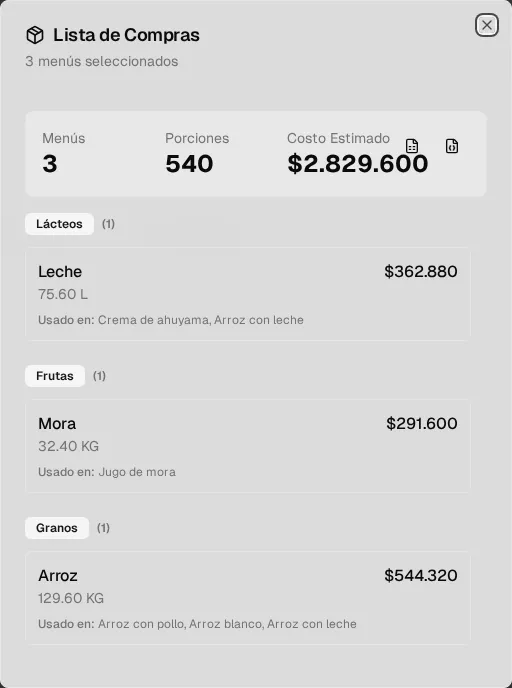
The Purchase List shows:
- The number of Menus, the Portions and the total Estimated Cost.
- The ingredients grouped by category, each one with the total quantity (with waste already applied), its cost and Used In (the recipes that need it).
- Buttons to download it as Excel or JSON.
How it’s calculated
Section titled “How it’s calculated”- Each recipe is scaled according to the menu’s estimated portions compared with the portions the recipe yields. If the menu has no estimated portions, the recipe is calculated at its base scale.
- Waste increases the quantity needed: adjusted quantity = quantity × (1 + waste / 100).
- Ingredients repeated across recipes are added up into a single row.
- Each ingredient’s cost is the adjusted quantity × its price per unit.