

Getting started
Create your account
The ways to get an Inspow account — your organization creates it or you sign up on its public page.
Your Inspow account always belongs to an Organization (your gym, school, clinic…). There is no “standalone” account: there are two ways to get one.
1. Your organization creates the account for you
Section titled “1. Your organization creates the account for you”This is the most common case. Your organization’s staff registers you with your email and tells you how to get in.
- If they didn’t share a password with you, or you don’t remember it, go to the sign-in screen, type your email and use Forgot password? to create one (Recover your password).
- If you sign in with Google or Microsoft and your organization has it enabled, you don’t need a password (see Sign in).
2. You sign up on your organization’s public page
Section titled “2. You sign up on your organization’s public page”Some organizations turn on online sign-up. In that case, on your organization’s sign-in screen you’ll see the Sign up button (next to “Don’t have an account?”), or they’ll share the sign-up link with you directly.
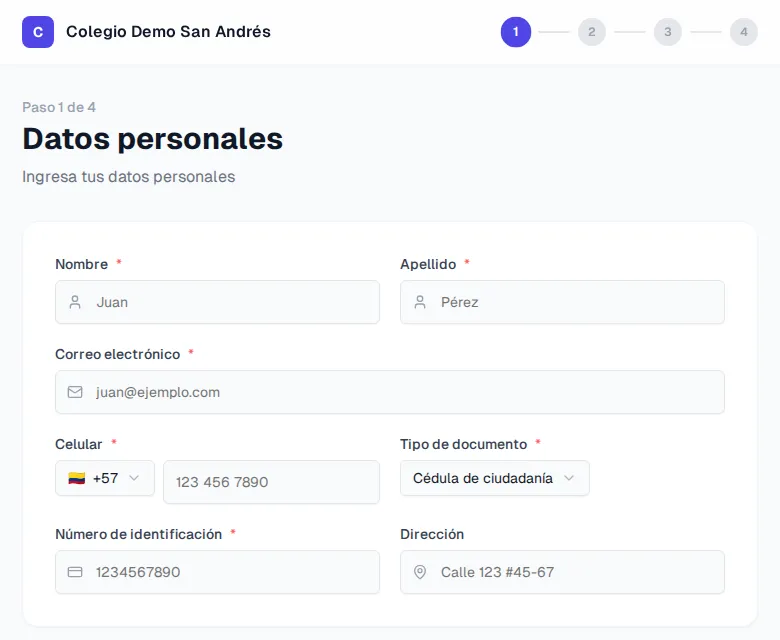
The sign-up has 4 steps:
- Personal details: first name, last name, email, mobile number, document type and number and, if you want, your address.
- Plan: you choose the plan you want to subscribe to.
- Beneficiaries: you register the people who will use the service (for example, your children), if your organization asks for it.
- Payment: you pay online to activate your subscription.
When you finish you’ll see Registration complete! and you’ll receive a temporary password in your email to get in.
After creating your account
Section titled “After creating your account”- Verify your email to protect your account.
- Complete your profile and turn on two-step verification if you want more security.